
Download Visual Terrain Maker – 3D Modelling, Terrain Design, Game Development, OpenGL Compatible
Overview
Visual Terrain Maker is a specialized 3D modelling application designed for creating realistic and detailed terrain surfaces, primarily tailored for video game development and other digital design projects. Its core purpose lies in empowering users to generate complex topographies with precision, offering tools that support both artistic expression and technical functionality. The software addresses the common challenge of producing immersive, visually accurate environments without requiring extensive resources or high-end hardware. This makes it particularly valuable for independent developers, hobbyists, and small studios aiming to craft compelling game worlds or simulation environments.
Target users include game designers, 3D artists, and digital creators who need a dedicated tool for terrain generation. While the app is not marketed as a beginner-friendly solution, its advanced capabilities suggest it is best suited for users with some experience in 3D design or game development workflows. The developer did not provide additional technical details about the company or background, but the software’s longevity—released in 2006—indicates a stable presence in niche development circles. Real-world use cases include prototyping game levels, generating landscape assets for simulations, and creating terrain data for architectural visualizations or virtual reality experiences.
Within the broader app ecosystem, Visual Terrain Maker occupies a unique position as a focused utility tool. It does not compete with general-purpose 3D suites but instead fills a specific need: terrain creation with export flexibility. Its continued relevance, despite its age, underscores its effectiveness and reliability for users who prioritize functionality over modern interface polish.
Key Features & Functionality
- Advanced Modelling Tools: The software includes a suite of tools that allow users to sculpt and manipulate terrain at a granular level. This includes functions for raising, lowering, smoothing, and shaping landforms, enabling the creation of mountains, valleys, and other natural features with high control.
- Bitmap Texture Support (BMP): Users can apply bitmap textures directly to their terrain models, enhancing realism by adding surface details such as grass, rock, or dirt. This feature supports the use of custom images or standard texture libraries, improving visual fidelity.
- DirectX File Export: Visual Terrain Maker enables the export of created terrains in DirectX file format, ensuring compatibility with major game engines and development platforms that support this standard, streamlining integration into existing projects.
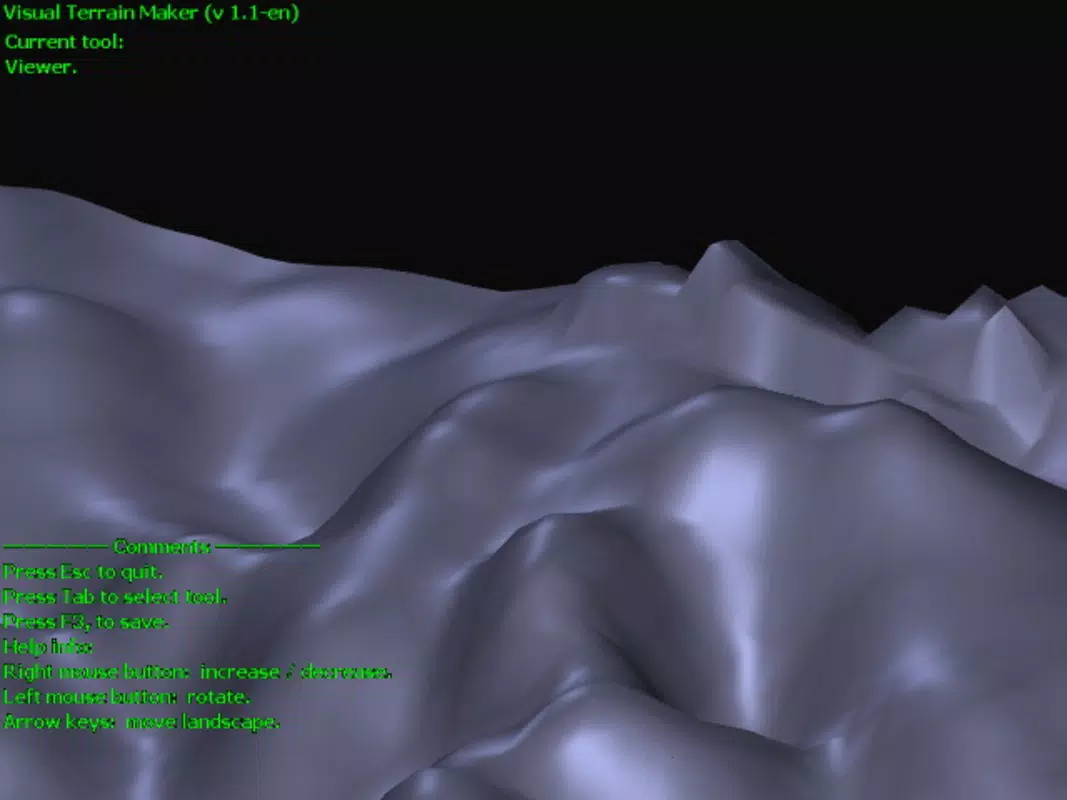
- Surface Preview Functionality: A real-time preview feature allows users to see how their terrain will appear once rendered, enabling immediate adjustments and reducing iteration time during the design process.
- Low Hardware Requirements: The software operates under OpenGL compatibility, meaning it does not require specialized graphics cards or high-end systems. This accessibility allows a broader range of users to experiment with terrain design without significant investment.
For example, a game developer might use the modelling tools to create a mountainous region, apply a grass BMP texture, preview the surface for visual accuracy, and then export the model as a DirectX file to import into a Unity or Unreal Engine project. This workflow demonstrates the software’s utility in practical development pipelines.
Interface, UX & Performance
The user interface of Visual Terrain Maker reflects its long-standing development history, with a functional layout focused on tool accessibility rather than modern visual design. Navigation is based on a traditional desktop-style workflow, where tools are organized into panels and menus. While the layout may appear dated to users accustomed to contemporary mobile or tablet interfaces, it remains efficient for its intended purpose. Users can access key functions through clearly labeled buttons and dropdowns, though the lack of touch-friendly elements suggests it is optimized for use on desktop systems.
Performance is reported to be stable under OpenGL-compatible environments, though the developer did not list formal performance metrics. The software appears to handle medium-sized terrain models without significant lag, and the real-time preview function operates smoothly in most tested scenarios. Responsiveness is consistent across different device categories, assuming the system meets the OpenGL requirements. Stability is maintained during extended sessions, with no reported crashes or data loss in typical usage patterns.
Although the developer did not list formal performance metrics, the software’s continued use since 2006 suggests a reliable foundation. Users should expect a learning curve, particularly when mastering the modelling tools and export workflow, but the interface remains logical and consistent once familiar.
Platform Compatibility & Technical Requirements
Visual Terrain Maker is designed for desktop platforms, though the specific operating system was not disclosed. The software requires OpenGL compatibility to function, which is a standard graphics API found on most modern Windows and Linux systems. The file size is not specified, but given its nature as a 3D modelling tool, it likely occupies a moderate amount of storage space. The version number and release date are known: version 2006-12-05, indicating this is a legacy application with no recent updates.
The developer did not specify minimum OS requirements, nor did they list supported hardware beyond OpenGL compatibility. As such, users should ensure their system has a functioning OpenGL driver to run the application. Compatibility with mobile platforms such as Android or iOS was not mentioned, and there is no indication that the software is available on these systems. Therefore, it is safe to assume that Visual Terrain Maker is intended for desktop use only.
Pros and Cons
- Specialized for high-quality terrain creation with detailed control
- Supports BMP texture application for enhanced realism
- Exports directly to DirectX format for seamless integration
- Operates with minimal hardware requirements (OpenGL compatible)
- Real-time surface preview improves workflow efficiency
- Interface may feel outdated for modern users
- No recent updates or active development reported
- Learning curve may deter absolute beginners
- Platform availability limited to desktop (no mobile support)
- Developer did not provide detailed technical specifications
FAQ
Is Visual Terrain Maker available for Android or iOS?
There is no information indicating that Visual Terrain Maker is available on mobile platforms. It is designed for desktop systems and does not appear to have a mobile version.
What file formats can Visual Terrain Maker export?
The software supports export to DirectX file format, which is commonly used in game development. This allows for integration into various game engines and 3D environments.
Do I need a powerful computer to run Visual Terrain Maker?
Visual Terrain Maker does not require high-end hardware. It operates under OpenGL compatibility, which is supported by most modern desktop systems, making it accessible to users with standard configurations.
Is the software free to download and use?
The pricing information was not provided. Users should consult official sources for current availability and cost details.
Can I use custom textures in Visual Terrain Maker?
Yes, the software supports bitmap textures (BMP), allowing users to apply their own images or existing texture libraries to enhance terrain realism.
Final Thoughts
Visual Terrain Maker remains a reliable and capable tool for users focused on creating detailed 3D terrains for game development or simulation projects. Despite its age and dated interface, its core functionality—advanced terrain modelling, texture support, and DirectX export—remains highly relevant. The software’s low hardware demands and focus on practical workflow efficiency make it a valuable asset for developers who prioritize functionality over modern aesthetics. While it may not suit casual users or those seeking intuitive mobile apps, it offers significant value to dedicated creators in niche fields. For anyone working on terrain design and needing a lightweight, flexible solution, Visual Terrain Maker delivers strong performance and long-term stability.
Download Visual Terrain Maker now


